FROM VB 6 TO VB STUDIO OR ANY JAGON
MIGRATION SUPPORT Modernizing the HSSP keyboard and device-control application From Visual Basic 6 to Visual Basic on modern .NET and Visual Studio 2026 Technical assessment • target architecture • migration plan • safety and release guidance Prepared 26 October 2026
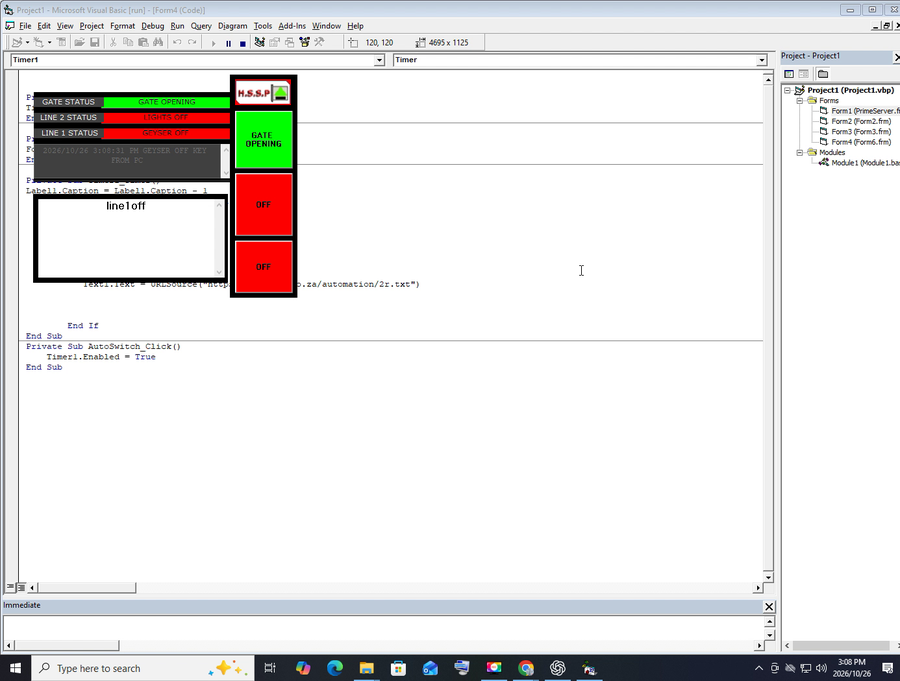
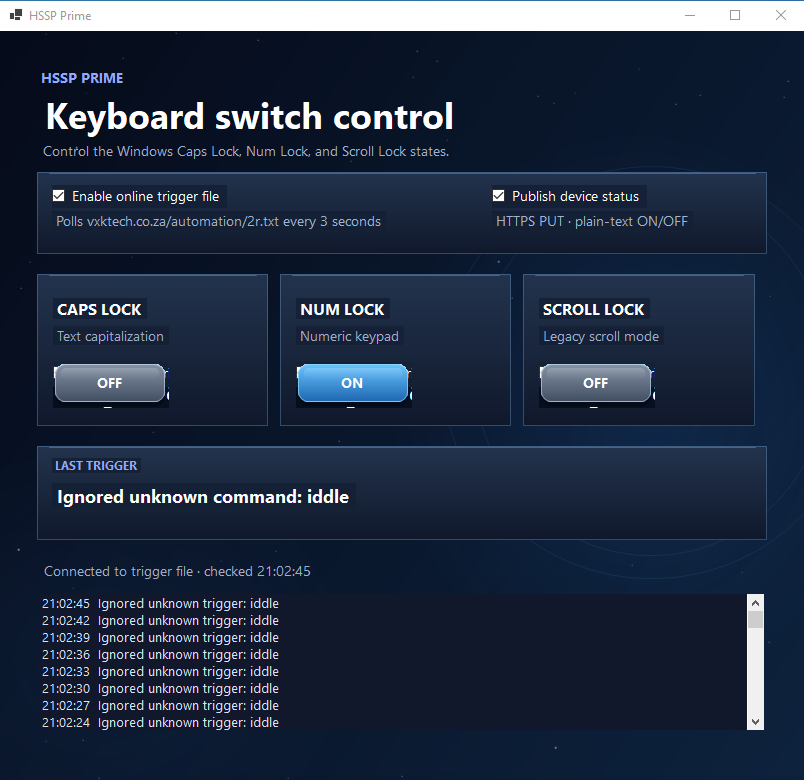
MIGRATION SUPPORT REPORT "NB: THE RECORDED VIDEO IS AVAILABLE ON REQUEST"
Modernizing the HSSP keyboard
and device-control application
From Visual Basic 6 to Visual Basic on modern .NET and Visual Studio 2026
Technical assessment • target architecture • migration plan • safety and release guidance
Prepared 26 October 2026. THE RECORDED VIDEO IS AVAILABLE ON REQUEST
| Assessment basis | What this report treats as evidence |
|---|---|
| Screen recording supplied | The recording is approximately 2 h 58 min. The available review captured its opening project view: a Windows Forms project targeting net10.0-windows and references to line trigger codes. It is possible to verify every later on screen or action frame by frame. |
| Legacy source previously supplied | Inspection of the VB6 project source identifies polling, keyboard-lock toggles, text commands, status displays, logging, and old Windows API calls described below. |
| Interpretation boundary | Screens, labels, filenames, and trigger strings are evidence of intended workflow; they do not establish that a physical gate, light, fan, or geyser was actually actuated or safety-tested. |
Audience: application owner, VB.NET implementer, controls/electrical integrator, installer and support team.
1. Executive recommendation
Rebuild the application as a Visual Basic Windows Forms desktop client using the SDK-style .NET 10 target and Visual Studio 2026 (18.x) with the .NET desktop development workload. Keep the first migration release deliberately narrow: preserve the familiar three-line operator workflow, remove dependence on VB6 runtime components and machine-wide keyboard state for appliance control, and add a documented adapter for the actual field controller before claiming real equipment operation.
The recording’s opening project view already shows an early net10.0-windows WinForms project and line1/line2/line3 trigger discussion. This is a useful starting point, not proof of a finished, secure or installable product. Microsoft lists .NET 10 as an LTS release supported through November 2028; use current servicing updates and reassess the target before each release. Visual Basic remains supported for established scenarios including WinForms, while Microsoft describes the language as stable and not the focus for new workloads/features. [1–4]
| Decision | Recommendation |
|---|---|
| Application UI | VB.NET WinForms, SDK-style project, .NET 10 LTS, x64/AnyCPU decision based on controller drivers. |
| Keyboard locks | Retain only as an explicitly labelled legacy/demo feature if users still need Caps/Num/Scroll Lock. Do not treat those states as appliance outputs. |
| Physical outputs | Use a vendor-supported relay/PLC/IoT controller and its documented authenticated interface; represent each output by a named device ID and confirmed state. |
| Cloud link | Replace public text-file polling with a TLS-protected authenticated command/status API. If files must remain temporarily, isolate them behind a server endpoint with per-installation identity, expiry and acknowledgements. |
| Delivery | Signed installer, least-privilege operation, recoverable settings/logs, upgrade/uninstall path, and an explicit safety acceptance test. |
2. What the legacy application does
The reviewed VB6 source has a main PrimeServer form, supporting forms, a project file, and a standard module. Its implementation combines user interface, local polling, keyboard-lock manipulation, text parsing, logging and remote text retrieval in form event handlers. The project is therefore a small control application, not merely a screen redesign.
| Observed behavior in source | Implication for migration |
|---|---|
| Windows key state calls use GetKeyboardState/GetKeyState and keybd_event for Caps Lock, Num Lock and Scroll Lock. | These calls mutate the interactive Windows session keyboard state. They are not relay outputs, do not provide device feedback and can confuse users or other software. |
| line1on/off maps to Caps Lock; line2on/off to Num Lock; line3on/off to Scroll Lock. | Preserve these strings only as a compatibility mapping. Introduce named command types and a versioned command contract. |
| A local text file is read on a roughly three-second timer; remote polling reads automation/2r.txt at a similar interval. | Polling introduces delay, duplicate/replayed commands, stale state and poor error visibility. Use command IDs, expiry, acknowledgement, retry policy and server-side authorization. |
| lockpc/unlockpc show/hide a local form. | Do not equate hiding a window with locking a Windows workstation or securing access. Use standard OS session controls and explicit app authorization. |
| Forms display GEYSER, LIGHT and GATE and write records under C:\ paths. | Labels show an intended association only. No direct relay/PLC implementation was found in the reviewed source. Fan control was not evidenced. Replace fixed paths with LocalAppData and structured records. |
3. Scope and safety boundary
The existing three keyboard lock indicators are software state in Windows. A gate motor, light circuit, fan or geyser requires a separate electrical control path. The reviewed source does not establish that it has one. Accordingly, this migration report does not describe the current program as a verified appliance controller.
Identify the exact controller hardware, firmware, wiring diagram, supported protocol, output ratings, feedback sensors and installation environment before implementing device adapters.
Use properly rated and certified control equipment. Mains wiring, protective devices, enclosure, isolation and installation must be assessed and completed by qualified personnel under applicable local codes.
Design safety behavior per device. A gate needs obstruction detection, travel limits, maximum run time, emergency stop/manual release and a safe close policy. A geyser needs independent thermostat and thermal cut-out protection. A fan needs suitable motor switching and overload protection.
Do not assume “all outputs off” is universally safe. Decide and document behavior for each load after app exit, PC crash, network loss, controller reboot and power restoration.
NIST treats building automation and physical access control as operational technology (OT), where safety, reliability and performance matter alongside cybersecurity. Use NIST SP 800-82 Rev. 3 as the current final OT security reference and review applicable South African electrical, fire and access-control requirements with the responsible professionals. [5]
4. Recommended target design
| Layer | Responsibilities | Design notes |
|---|---|---|
| WinForms presentation | Device list, desired/observed state, connection status, operator confirmation, diagnostics. | Keep UI responsive; async I/O; show “unknown/offline” separately from OFF. |
| Application services | Validate operator actions, route commands, enforce roles, coordinate acknowledgements. | Commands should set a target state, not blindly toggle. Record who/what requested it and result. |
| Device adapters | Translate generic operations to the specific relay/PLC/controller protocol. | One adapter per supported controller family; strict timeouts; no UI code calling device APIs directly. |
| Cloud/API client | Authenticated command retrieval/submission and status reporting. | TLS certificate validation, unique installation identity, least privilege, bounded retries, replay protection. |
| State and audit | Settings, device map, command results, health and diagnostic logs. | SQLite or versioned JSON settings in LocalAppData; rotate logs; never log passwords or access tokens. |
| Hardware and feedback | Relay/PLC output, safety interlocks, limit/temperature/current sensors. | Show desired state and measured state separately; controller feedback is authoritative for actual state. |
Command contract
Prefer an operation such as SetState(deviceId, desiredState, commandId, issuedAt, expiresAt) over a toggle. “ON” sent twice must still mean ON. The adapter should return Accepted, Applied, Rejected, TimedOut or Unknown, with a reason and controller-reported state where available. For a movement action such as gate open/close, define a separate bounded operation with interlocks rather than presenting it as a generic maintained relay state.
Illustrative VB.NET boundary
Public Enum DeviceState
    Off
    On
End Enum

Public Interface IDeviceAdapter
    Function SetStateAsync(deviceId As String, target As DeviceState,
                           cancellationToken As CancellationToken) As Task(Of DeviceResult)
    Function ReadStateAsync(deviceId As String,
                            cancellationToken As CancellationToken) As Task(Of DeviceResult)
End Interface
Illustrative interface only. The correct operations, safety checks and device result types depend on the selected controller. It is not a driver or evidence of working hardware integration.
5. Migration plan
Inventory and baseline
Archive source and installer; inventory forms, controls, timers, modules, API endpoints, config, data files, OCX/DLL/DAO dependencies and compile settings. Record each current action and expected response. Do not transfer sample credentials or personal records into the new build.
Define requirements and hardware contract
Confirm each line-to-device mapping; controller make/model; command/status API; state sensors; network/local operation; manual override; roles; safety behavior; failure states; retention and support model.
Create modern shell
Create a VB Windows Forms app targeting net10.0-windows. Move UI into forms/user controls and services into separate classes. Use dependency injection only if useful; keep the first codebase simple and testable.
Port pure behavior
Translate command parsing and state display first. Replace stringly typed logic with enumerations/records; validate input; make operations asynchronous and cancellation-aware. Keep keyboard-lock actions in a separate legacy adapter.
Implement adapters and protocol
Build against the documented vendor SDK/API. Simulate hardware responses first, then bench test the actual controller with safe low-voltage loads. Require feedback and timeouts.
Modernize server channel
Replace plain polling file with authenticated HTTPS endpoints or a broker. Require unique device identity, least-privilege credentials, server-side authorization, command ID, expiry, nonce/replay rejection, acknowledgement and auditable outcome.
Move storage and settings
Store per-user files under %LocalAppData%\Vendor\Product, or use SQLite for structured history. Add schema version and migration. Avoid writing to C:\ root or the application install directory.
Release and support
Sign binaries and installer, publish versioned release notes, define supported Windows versions, collect redacted diagnostic bundles, provide rollback and uninstall, and document how to update credentials.
6. Server status reporting and security
Earlier requirements named line1state.txt, line2state.txt and line3.txt under the /ufo path. Treat that as a transition constraint, not as a complete API definition. A browser-readable static file gives no safe write semantics, caller identity, concurrency handling or proof that the physical output changed. Confirm server ownership and agree the write method, authentication, response format and cache policy before connecting the public client.
Prefer POST/PUT JSON over static-file overwrites. Example response fields: deviceId, desiredState, observedState, updatedAtUtc, controllerOnline, commandId and result.
If a temporary file bridge is unavoidable, use separate per-device or per-installation paths, atomic replacement, strict allowlisted values (ON/OFF only), no directory listing, no secrets in URLs, no-cache headers, short TTL, authenticated write access and a server-side audit trail.
Do not put a shared Drupal administrator password or permanent API secret in the desktop executable. Issue revocable, scoped credentials per installation, rotate them, and use a backend to hold privileged server credentials.
Apply command expiry and replay detection; validate TLS certificates; rate-limit; record access outcomes without recording tokens. Provide an operator-visible “server unreachable” state.
For a controller that supports direct local operation, define whether local controls or cloud commands take priority during loss of connectivity. Preserve manual emergency control even when the desktop app is unavailable. NIST IoT cybersecurity guidance is useful for defining device capabilities and manufacturer-provided security information. [6–7]
7. Verification and acceptance matrix
| Area | Minimum acceptance evidence |
|---|---|
| Compatibility | Build on a clean machine with the declared .NET desktop workload/runtime; launch on each supported Windows version; test high DPI and non-admin account. |
| Legacy commands | line1on/off, line2on/off, line3on/off parse correctly; malformed, unknown and oversized payloads are rejected; duplicates are idempotent. |
| Hardware | Each controller action verified on a bench with safe test loads; compare requested, controller and sensor states; test disconnected, timeout and partial failure. |
| Safety | Gate obstruction and limit-switch scenarios; emergency stop/manual override; geyser thermal cutoff and maximum runtime; fan overload/appropriate switching; no app path bypasses independent interlocks. |
| Network/security | Expired/replayed command rejected; invalid certificate rejected; unauthorized caller denied; retry cannot duplicate a movement pulse; credential revocation works. |
| State/reporting | Cloud status never labels an unconfirmed state as confirmed; last update age shown; error and offline transitions are visible; upload failure is retried within policy. |
| Recovery | PC/app/controller/network/power restart; defined safe state; no stale command replay after reconnect; local settings and records recover. |
| Distribution | Signed installer upgrade, repair, rollback and uninstall; no user data removed unexpectedly; support bundle excludes credentials and personal data. |
8. Release, maintenance and public support
Choose framework-dependent deployment when centrally managing the .NET Desktop Runtime, or self-contained deployment when easier installation outweighs larger packages and separate runtime servicing. Rebuild and publish security updates either way.
Use a signed MSIX or a reputable signed installer with publisher identity, version, upgrade code and uninstaller. Never bundle legacy runtime/OCX files without confirming licensing and security suitability.
Use a release pipeline that builds from source, runs the project’s chosen automated checks, scans dependencies, creates a signed artifact, records an SBOM and retains release provenance.
Publish a support guide covering installation prerequisites, controller pairing, network setup, manual override, logs, known errors, safe shutdown and how to report a fault.
Keep a compatibility table: app version, Windows version, .NET runtime, controller model/firmware, API version and any required driver.
The old VB6 IDE has been unsupported since 8 April 2008. Microsoft continues to support the VB6 runtime on supported Windows versions under limited compatibility conditions, but recommends migration. Avoid designing a new public product around VB6 runtime deployment or obsolete ActiveX dependencies. [1]
9. Decisions needed before hardware integration
| Decision | Required answer |
|---|---|
| Controller | Manufacturer, model, firmware, protocol/SDK, network topology and certification. |
| Mapping | What physical device is line 1, 2 and 3? Is each a maintained output or a momentary action? Is a fan or more outputs part of phase one? |
| Feedback | Which sensors confirm actual state and what happens if commanded state differs? |
| Server contract | Exact base URL, endpoint, HTTP verb, payload, authentication, response, caching, rate limit and ownership/support contact. |
| Operating model | Single local PC or multiple installations/users? Local control available when server is down? Who can issue commands? |
| Safety and jurisdiction | Applicable electrical/access rules, installer responsibilities, emergency operation and per-load fail state. |
| Product scope | Supported Windows versions, languages, installer format, update channel, warranty and support period. |
10. Conclusion
The practical modernization path is a VB.NET WinForms rebuild on .NET 10 LTS with a clean boundary between the interface, command service, authenticated server client and verified device adapters. The visible recording project is aligned with the recommended Windows desktop technology, but migration completion depends on replacing legacy polling and fixed-path logging, and—most critically—identifying and validating the real output controller and safety feedback. Until that work is complete, describe the application as a command/status interface or keyboard-lock utility, not as a verified gate, lighting, fan or geyser controller.
References
[1] Microsoft, Visual Basic 6.0 Support Policy.
[2] Microsoft, .NET releases and support.
[3] Microsoft, Install .NET on Windows (Visual Studio and SDK compatibility).
[4] Microsoft, Visual Basic language strategy; Visual Studio 2026 release notes. ;
[5] NIST SP 800-82 Rev. 3, Guide to Operational Technology (OT) Security.
[6] NIST IR 8259 Rev. 1, Foundational Cybersecurity Activities for IoT Product Manufacturers.
[7] NIST IR 8259A, IoT Device Cybersecurity Capability Core Baseline.
[8] Microsoft, Windows Forms migration guide.