Engineering Guide: DIY Passive PoE Injection Using ATX PC Power Supplies
This technical guide demonstrates how to repurpose a standard ATX computer power supply (or alternative IT equipment power adapters) to construct a custom Passive Power over Ethernet (PoE) injector. This bench setup allows network engineers and field technicians to power multiple passive PoE devices—such as Ubiquiti and MikroTik Wireless Wire/5G/2.4GHz CPEs—either individually or via PoE pass-through (PoE-downstream relay).

1. Electrical & Structural Preconditions
Passive PoE does not negotiate power requirements between the Power Sourcing Equipment (PSE) and the Powered Device (PD). It applies continuous, raw voltage directly across specific wire pairs inside the Category (Cat5e/Cat6) Ethernet cable.
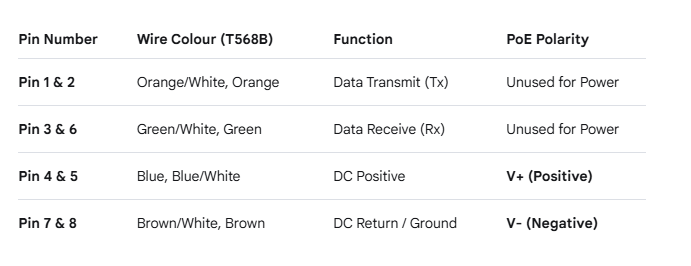
Pinout Configuration (8P8C / RJ45)
To comply with the industry standard for 10/100 Mbps passive PoE systems, the 8-wire Ethernet cable must be split into distinct Data and Power lines based on the pin mappings below:
Pin NumberWire Colour (T568B)FunctionPoE PolarityPin 1 & 2.
Orange/White, OrangeData Transmit (Tx)Unused for Power
Pin 3 & 6 Green/White, GreenData Receive (Rx)Unused for Power
Pin 4 & 5 Blue, Blue/WhiteDC PositiveV+ (Positive)
Pin 7 & 8 Brown/White, BrownDC Return / GroundV- (Negative)
2. Step-by-Step Hardware Preparation & ExecutionStep 2.1: Jumping the ATX PSU (PS-ON Initialization)
An ATX power supply will not energize its high-current output rails simply by plugging it into a mains AC wall socket. It requires a low-voltage logic signal to turn on:
- Locate the primary 24-pin (or 20-pin) ATX main power connector.
- Identify Pin 16 (PS-ON, typically green) and any adjacent Ground pin (COM, black, typically pins 15 or 17).
- Bridge (short-circuit) these two pins using a solid-core jumper wire or splice. This overrides the motherboard power switch, forcing the supply to boot immediately upon receiving AC power.
[ 24-PIN ATX CONNECTOR ]
=================================
| [ ] [ ] [ ] [GND] [PS-ON] [ ] |
=================================
| |
+------+ <-- (Bridge Green to Black)
Step 2.2: Splicing and Calibrating the DC Voltage Rail
Most common Ubiquiti and MikroTik outdoor wireless systems operate safely on a 24V DC Passive PoE profile. Standard ATX power supplies offer +3.3V, +5V, and +12V rails relative to Ground.To obtain 24V DC, exploit the relative potential difference across the +12V rail and the -12V rail:
- Positive Lead (V+): Connect to the +12V rail (typically the Yellow wires on peripheral Molex or PCIe connectors).
- Negative Lead (V-): Connect to the -12V rail (typically a single Blue wire on the 24-pin ATX connector).
\(\Delta V=(+12\text{V})-(-12\text{V})=24\text{V}\)
⚠️ Critical Safety Note on Capacitive Discharge: If the spliced positive and negative DC output wires accidentally touch (short-circuit), the internal over-current protection (OCP) circuit of the PSU will trigger a safety shutdown. If this happens, disconnect the AC power source. Wait 1 to 2 minutes before troubleshooting or switching the unit back on. This delay allows the high-capacity internal capacitors to bleed off dangerous residual energy safely.
Step 2.3: Wiring the RJ45 Passive PoE Injector Tail
- Strip back the outer jacket of an ordinary Ethernet patch cable to expose the individual twisted pairs.
- Group the Blue and Blue/White conductors (Pins 4 and 5) together. Connect this combined cluster to the +12V Yellow wire (Positive) from the power supply.
- Group the Brown and Brown/White conductors (Pins 7 and 8) together. Connect this combined cluster to the -12V Blue wire (Negative) from the power supply.
- Keep the Data pairs (Pins 1, 2, 3, and 6) structurally isolated to avoid inductive power bleeding or data packet corruption.
- Deploying Device Configurations and Power Topologies
Once your custom passive injector is built and verified with a digital multimeter, you can deploy it using one of two primary network architectures:Topology A: Direct Single-Device Injection - Connect the newly wired RJ45 tail directly into the PoE-In / LAN port of the target device. This setup supplies immediate 24V operational power to individual hardware systems:
- MikroTik RouterBOARD / 5G CPE
- Ubiquiti airMAX 5G High-Gain CPE
- Ubiquiti airMAX 2.4G Legacy Legacy/CPE
[ATX PSU (24V)] ---> [Spliced Injector Tail] ---> [Device PoE-In Port]
Topology B: Downstream PoE Pass-Through (Chain Mode)
For multi-device deployments (such as co-locating a MikroTik backhaul dish and a Ubiquiti sector AP on a single mast) without running dual power lines:
- Route the primary 24V source line into the PoE-In port of the primary master device (e.g., a Ubiquiti or MikroTik model equipped with a secondary PoE-Out port).
- Access the operating system software of the primary device (via Ubiquiti airOS or MikroTik RouterOS).
- Navigate to the interface configuration settings and manually change the secondary Ethernet port status to PoE-Out: Enable (or poe-out=forced-on).
- Connect a secondary Ethernet patch cable from the PoE-Out / Secondary port of the master device over to the PoE-In port of the secondary guest device. This forwards the DC power down the chain.
[ATX PSU (24V)] ---> [Master Device: PoE-In]
|
(Enable PoE Pass-Through)
|
[Master Device: PoE-Out] ---> [Secondary Device: PoE-In]
- Alternative Input Power Sources
- If an ATX computer power supply is unavailable, the identical wiring mechanics can be applied to standard consumer IT power adapters. Check the manufacturer specifications printed on the power brick casing to ensure the voltage meets device requirements:
- Laptop Power Bricks: Often output between 19V and 20V DC. This is usually sufficient to power wide-input-voltage MikroTik systems and shorter cable runs of Ubiquiti hardware.
- Office Printer Power Adapters: Frequently feature native 24V DC outputs, making them highly stable, drop-in alternatives for standard 24V passive PoE hardware.