Short version. Same idea as the VB6 app, rebuilt with .NET 10, HttpClient and DPAPI. The installer
Technical report on HSSPPrimeSetup.zip, the VB.NET rewrite of the VB6 “hsspv10” gate, light and geyser controller.
Contents Summary Package inventory Toolchain and build Timeline Architecture Behaviour Versus the VB6 original Installer Findings Recommendations Method and limits
HSSP Prime (.NET): how it was built
Technical report on HSSPPrimeSetup.zip, the VB.NET rewrite of the VB6 “hsspv10” gate, light and geyser controller.
Archive 7 files, 93 KB Language VB.NET Framework .NET 10, Windows Forms Basis compiled-binary inspection
Summary
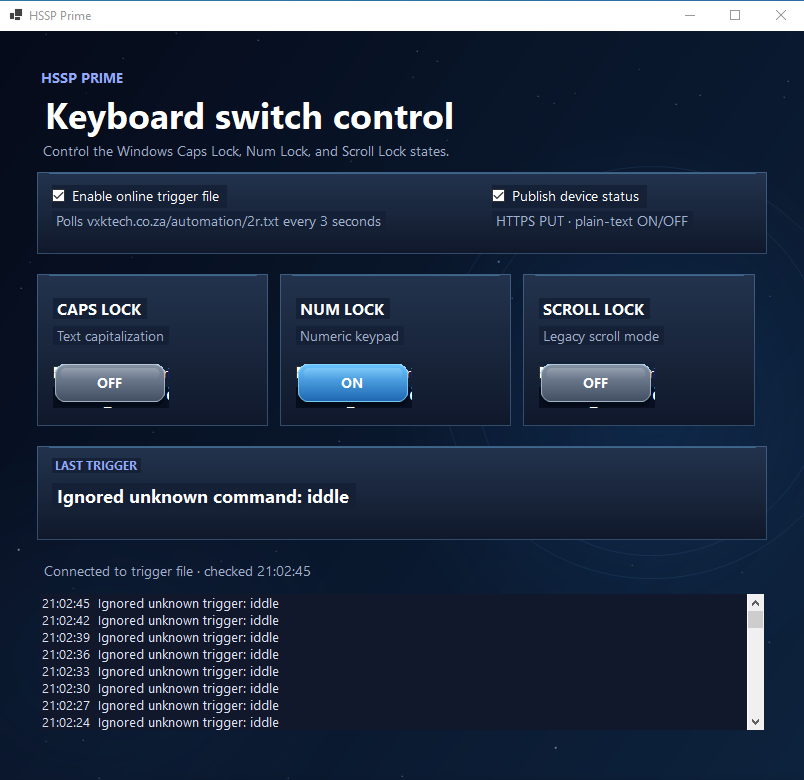
The archive is a per-user installer for a compiled .NET 10 Windows Forms app. It carries no source code. Its README describes it as a rewrite of the earlier VB6 project: it still drives the Caps Lock, Num Lock and Scroll Lock keys as three switches, still polls https://yoursite.com/automation/2r.txt for commands, and adds optional status publishing to https://yoursite.com/ufo/line[1-3]state.txt.
The managed assembly is small: 20 types, 78 methods and about 9.6 KB of IL, built in Release mode with the VB compiler. The design fixes most of the weaknesses of the VB6 version (explicit state setting, async networking, a command whitelist, no hard-coded password), but the incoming command channel is still unauthenticated and the delivery package is missing the project file the README tells you to open.
Short version. Same idea as the VB6 app, rebuilt with .NET 10, HttpClient and DPAPI. The installer is a PowerShell script that copies four files into %LOCALAPPDATA%.
Package inventory
FileSizeRole Install.cmd116 BLaunches Install.ps1 with -NoProfile -ExecutionPolicy Bypass, pausing on error. Install.ps11.8 KBChecks for the .NET 10 Desktop Runtime, copies the app, creates shortcuts, starts it. README.md3.2 KBInstall, usage, protocol, command list and scope notes. app/HSSPPrime.exe162 KBStandard .NET “apphost”: a native x64 launcher that loads HSSPPrime.dll through hostfxr. Windows GUI subsystem. app/HSSPPrime.dll31 KBThe actual program: a managed VB.NET assembly (CLR v4.0.30319 metadata), assembly version 1.0.0.0. app/HSSPPrime.runtimeconfig.json519 BRequires Microsoft.NETCore.App and Microsoft.WindowsDesktop.App 10.0.0. app/HSSPPrime.deps.json421 BDependency manifest: the project only, no NuGet packages.
The app is framework-dependent (not self-contained), which is why it is tiny and why the installer insists on the .NET 10 Desktop Runtime. There are no third-party libraries; the deps file lists only the project itself.
Not included: the .vbproj, any .vb source, the PDB and the Assets folder that the installer script references.
Toolchain and build
AspectFindingEvidence Language and compilerVisual Basic .NET compiled by Roslyn (vbc).References to Microsoft.VisualBasic.Core, StandardModuleAttribute, $VB$Local_* locals and VB$StateMachine_* async types. Targetnet10.0-windows, Windows Forms, supported OS platform Windows7.0.TargetFrameworkAttribute, SupportedOSPlatformAttribute and runtimeconfig. ConfigurationRelease build, deterministic output.PDB path ends obj\Release\net10.0-windows\HSSPPrime.pdb. The DLL header timestamp reads 2059, which is how deterministic builds hash the date field. Output formStandard dotnet build or publish layout with an apphost.HSSPPrime.exe embeds the apphost template and the target name HSSPPrime.dll. Build environmentA workspace folder named \HSSPPrime under a local user profile.Path embedded in the DLL. Inferred The folder name suggests the project was generated inside an AI coding-assistant workspace. PackagingHand-written ZIP plus a PowerShell script. No MSI, MSIX or Inno Setup.Only Install.cmd and Install.ps1 are present. SigningNone.README states the installer is unsigned. Privacy note. The shipped DLL contains the full local build path, which includes a Windows account name. Build with PathMap or strip the path before distributing outside your own machines.
Timeline from file stamps
- 22 Oct 2026Compile stamp of the apphost template inside HSSPPrime.exe (it comes from the SDK, not from the project).
- 25 Oct 2026Date of the build workspace folder in the PDB path.
- 26 Oct 2026, 15:28Install.cmd, the oldest file. The VB6 source in the previous archive was touched earlier the same day (13:58 to 15:19), so the rewrite began right after.
- 26 Oct 2026, 17:17Install.ps1, deps.json and runtimeconfig.json.
- 26 Oct 2026, 19:17Final HSSPPrime.dll, HSSPPrime.exe and README.md. Two build passes are visible. The installer still deletes Assets\switch-layout-reference.png, a leftover from an earlier iteration that used a screenshot as the background.
Architecture
Reading the type and method tables gives 12 application types plus compiler-generated ones. Sizes below are IL bytes.
TypeRoleIL ProgramEntry point (Main, STA thread, visual styles).22 MainFormUI builder, background painting, command handling, 500 ms state refresh, publish orchestration. Almost half of all code.4,476 KeyboardLocks / KeyboardLockP/Invoke wrapper for GetKeyState and keybd_event; enum of the three keys.90 TriggerPollerTimer-driven async download of the trigger file, with cancellation and a command event.490 (+525 async) StatusReporterAsync HTTPS PUT of ON or OFF as text/plain.111 (+721 async) ConnectionSettingsFormDialog “Web keypad connection” for a base URL and a device token.791 SettingsStore / AppSettingsJSON settings file, written via a temp file.248 / 59 WindowsDpapiCryptProtectData and CryptUnprotectData wrapper that encrypts the token for the current Windows user.265 GlassPanel, StateTriggerButtonCustom-painted translucent panel and rounded, raised switch button (GDI+).306 / 1,005
The program is event-driven. TriggerPoller raises CommandReceived and StatusChanged events, and the form subscribes to them. Re-entrancy is controlled with Interlocked.CompareExchange flags (_busy, _publishBusy) and a _publishAgain flag, which coalesces rapid state changes into one more upload instead of overlapping requests. A _lastSeenStates dictionary detects which key changed.
Behaviour recovered from the binary
- Setting a state. Each switch sets an explicit on or off value. SetState reads the current state with GetKeyState, sends a key down and up only if needed, waits briefly, and checks again. If Windows did not confirm the change, the log says so.
- Commands. The only accepted strings are line1on/off, line2on/off, line3on/off, lockpc and unlockpc. They are matched by a compiled string-hash Select Case, so nothing is evaluated or executed. Unknown values are logged as ignored.
- lockpc. It disables the app’s own switch panel only; it does not lock the Windows session.
- Polling. HttpClient.GetStringAsync with a timeout and a cancellation token. Responses over a fixed length are rejected (“Trigger file response is too long; ignored.”). It is off by default.
- Publishing. HttpClient.PutAsync with text/plain to three fixed file names under https://yoursite.com/ufo/once when enabled and again on every state change. Success and HTTP errors show in the activity list.
- URL checks. The settings dialog uses Uri.TryCreate and requires the HTTPS scheme.
- Settings. settings.json under an HSSPPrime folder, written through a .tmp file. The device token is stored encrypted with Windows DPAPI (user scope), described in the dialog as “never stored in plain text”.
- Logging. The activity list is in memory only. No file-append code is present.
- UI. A code-drawn deep-space background (DrawNebula, random stars, gradient brushes), glass panels and owner-drawn switch buttons. No image files are needed.
Versus the VB6 original
AreaVB6 (hsspv10).NET rewrite Switch logicToggles keys blindly; state tracked by text-change events.Sets an explicit state, verifies it, refreshes every 500 ms. NetworkingSynchronous WinINet, no timeout, leaked session handles, fetched twice per tick.Async HttpClient, timeout, cancellation, one request, HTTPS enforced. CommandsString compare against a text box.Exact whitelist, length cap, logged rejection. PasswordHard-coded hsspv10 in a form outside the project.Removed. The login form is not carried over. Schedule18:00:00 and 06:30:00 on line 3.No scheduler present (no time literals except the log format HH:mm:ss). LogsAppended to C:\HSSPRECORDS.txt, unbounded.In-memory list only; legacy files not imported. Status outputLocal file and screen only.Optional HTTPS PUT of each line’s state. SecretsPlaintext password.DPAPI-encrypted device token. DeploymentPDW setup.exe + CAB, shipped system DLLs, needs admin.Per-user PowerShell copy, no admin, needs .NET 10 runtime. SizeAbout 80 KB p-code exe plus about 4 MB of runtime redistributables.31 KB DLL + 162 KB apphost; runtime installed separately.
Installer walkthrough
- Install.cmd runs PowerShell with the execution policy bypassed for that one process.
- Install.ps1 runs dotnet --list-runtimes and looks for Microsoft.WindowsDesktop.App 10.*. If it is missing, the script opens the Microsoft download page and exits with code 2.
- It verifies that app\HSSPPrime.exe exists beside the script, creates %LOCALAPPDATA%\Programs\HSSPPrime and copies the folder with robocopy /E.
- It deletes Assets\switch-layout-reference.png if an older install left it behind.
- It creates “HSSP Prime” shortcuts in the Start menu and on the Desktop, then launches the app.
There is no uninstaller, no auto-start entry and no service. The app runs only while a user is signed in and has started it or autostart.
Findings
SeverityFindingWhy it matters HighThe inbound trigger file is still unauthenticated.Anyone able to edit 2r.txt can switch the three lines (including the gate, as labelled in the earlier app). The whitelist stops code execution but not misuse of valid commands. Polling being off by default reduces exposure only until someone enables it. MediumStatus uploads depend on an unauthenticated PUT.The README says the server must allow PUT to the three files. If it accepts any caller, anyone can falsify or deface the status. If the files are publicly readable, gate and light state is public. MediumThe device token appears to be stored but not sent.The assembly has a token field, a DPAPI wrapper and a settings dialog, but no request-header or authorization members appear in its metadata, and the README does not mention the token. Inferred This build may not authenticate its requests at all. MediumSource is not delivered.The README says to open HSSPPrime.vbproj, but the archive has only binaries. The code cannot be audited or rebuilt from this package. LowTwo base URLs and unclear precedence.The settings default is …/automation, while the publisher hard-codes …/ufo/. How the dialog’s value is used is not visible without source. LowUnsigned installer, -ExecutionPolicy Bypass, no checksum.Normal for a per-user script, but recipients cannot verify integrity and Windows will warn. LowRuntime check does not confirm x64.The script matches only the runtime name and version, while the README requires the x64 runtime. LowNeeds an interactive desktop.The error text says to try again while signed in to the desktop. Simulated key presses will not work from a service or a locked session, and nothing restarts the app after a reboot. LowBuild path leaks into the shipped DLL.It contains a local account name and project location.
Recommendations
- Authenticate both directions. Send the stored token as a bearer header on GET and PUT, or sign each command with an HMAC and timestamp so old or forged values are rejected.
- Ship the source (the .vbproj, .vb files and a README build section) or remove the instruction, and keep it in Git.
- Resolve the URL settings. Use one configurable base URL for the trigger and status endpoints, and document it.
- Harden delivery. Code-sign the exe, publish a SHA-256 checksum, add an uninstall option, verify architecture, and set PathMap to remove the build path.
- Make it a real automation host. For unattended use, add an auto-start entry or a scheduled task at logon, and consider replacing lock-key signalling with a relay board that reports its true state.
- Restore what was lost on purpose or by accident: the time schedule and a persistent log, if you still need them.
Method and limits
There is no source in the archive, so this is a binary-level review. I read the scripts, README and JSON files in full, and parsed the DLL’s .NET metadata directly: type and method tables, IL body sizes, the string heap and the user-string heap (all 74 literal strings), and the PE headers of both binaries. I did not decompile method bodies, run the app or contact any URL.
- Behaviour is inferred from member names, literals and sizes. Claims like “verifies the state after setting it” rest on the presence of GetKeyState, a sleep call and the “Windows did not confirm” message, not on reading the instructions.
- Whether the token is used cannot be confirmed without the source or a runtime trace.
- The file stamps come from the ZIP and PE headers; the DLL timestamp is a deterministic-build hash, not a real date.
Companion to the earlier VB6 report (hsspv10). Both packages target the same hardware assumption: keyboard lock states used as switch outputs.