VIEW USED DATA : pfSense Plus Statistics holistically across the whole networks
We're going to look at how to view or how to get the statistics of pfSense Plus holistically across the whole networks, whoever is connected to your firewall router. They are going to be counted in these statistics. In a case you don't know what is pfSense, pfSense is a firewall that, is programmed to give you many many options where you can reprogram it the way you want, the way it suits you or your business,
Today, we will explore how to view comprehensive network statistics in pfSense Plus across your entire infrastructure. Every device connected to your firewall router is captured in these analytics.For context, pfSense is a highly customizable, open-source firewall platform that allows administrators to tailor network security and routing to their specific business requirements.
Viewing Interface Bandwidth Statistics
To determine total data consumption (in megabytes or gigabytes) since the system's last reboot, follow these steps:
- Navigate to the Status menu in the top navigation bar.
- Select Interfaces from the drop-down menu.
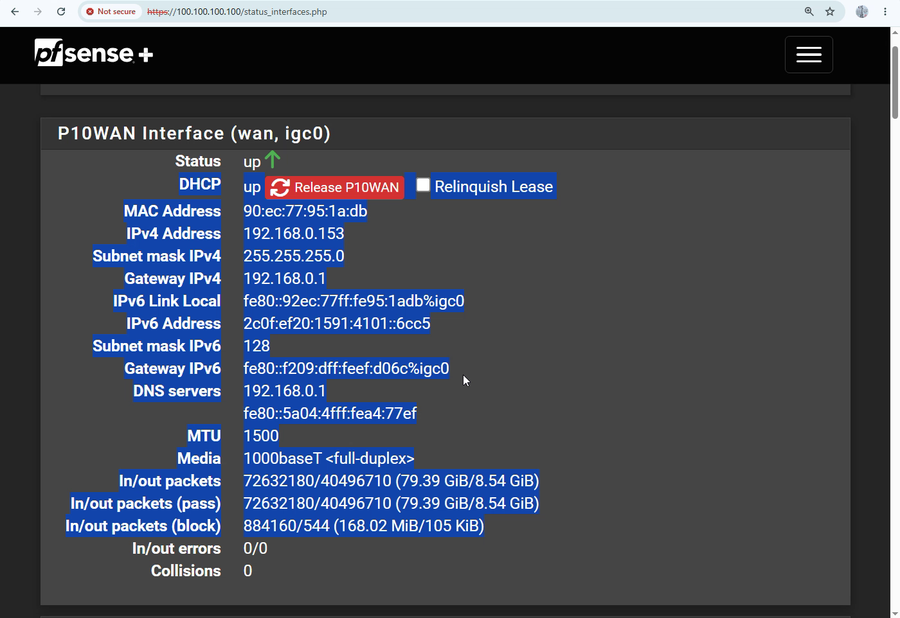
Within this dashboard, you will find detailed metrics for all configured interfaces. The most critical metric for overall consumption is the WAN (Wide Area Network) interface, which represents your primary internet gateway.As shown in this example—based on a system uptime of 2 days, 2 hours, 39 minutes, and 24 seconds—the cumulative network traffic is broken down as follows:
- Inbound Traffic (Download): 79.939 GB
- Outbound Traffic (Upload): 8.54 GB
While this specific Netgate appliance utilizes multiple network interfaces for segmented local networks, the WAN interface provides the holistic view of your external data footprint.
Upcoming Topics:
Bandwidth Shaping
In our next guide, we will cover traffic management and data capping. You will learn how to implement bandwidth shaping to restrict individual users or devices to specific speed thresholds (e.g., limiting a user to 20 Mbps or 50 Mbps) to ensure optimal network performance and prevent bandwidth exhaustion.
Thank you for reading/watching/listening. This guide was produced by Raymond Chauke from Chauke.org demonstrating capabilities on a Netgate hardware device running pfSense Plus.
Subscribe to our channel for more technical walkthroughs.