Wireless backhaul links using Ubiquiti Light Beam 5AC Gen2 devices integrated into a pfSense Plus
Wireless backhaul links using Ubiquiti Light Beam 5AC Gen2 devices integrated into a pfSense Plus
“The Access Point / Sector (Right Side): Positioned at the tower or main distribution point to broadcast the primary internet feed. The Client Station (Left Side): Positioned at the local client site (named "B Molatu" in this example), pointing back toward the tower.”
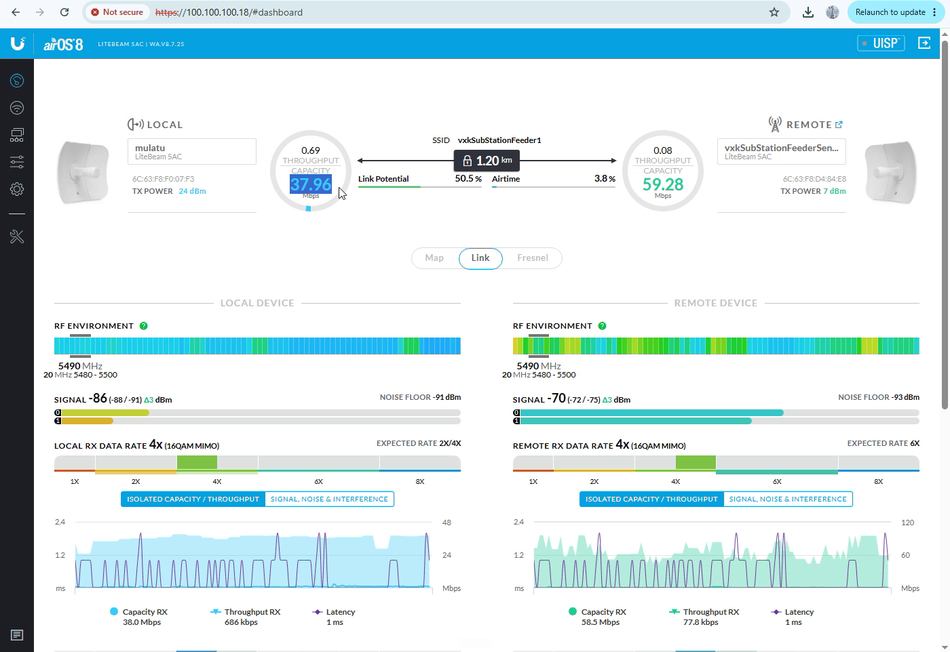
Welcome. Today, we will look at how to optimize wireless backhaul links using Ubiquiti LightBeam 5AC Gen2 devices integrated into a pfSense Plus routing environment. We will cover how configuration settings, physical alignment, and hardware bottlenecks impact your over-the-air link potential and actual local area network (LAN) throughput.Understanding the Wireless Point-to-Point (PtP) TopologyA standard Ubiquiti airMAX deployment consists of a wireless bridge established between two devices:
- The Access Point / Sector (Right Side): Positioned at the tower or main distribution point to broadcast the primary internet feed.
- The Client Station (Left Side): Positioned at the local client site (named "B Molatu" in this example), pointing back toward the tower.
When analyzing the management dashboard, the Link Potential metric indicates the theoretical capacity of the RF (Radio Frequency) environment. In this deployment, the over-the-air link spans a physical distance of 1.2 kilometres, capable of carrying an airside transmission speed up to 250 Mbps.Key Variables Affecting Link PerformanceIf your throughput is fluctuating heavily or underperforming, check the following key settings:1. RF Signal Strength & Antenna Alignment
- Current Status: The current client-side alignment yields a signal strength of -71 dBm to -87 dBm.
- The Fix: For optimal performance, the physical antennas should be meticulously realigned to achieve a cleaner signal between -50 dBm and -68 dBm. Improving the signal to this threshold stabilizes fluctuations and unlocks the true wireless capacity of the beams.
- Software Distance Limitations Adjusting the auto-timeout or hardcoding the distance configuration directly changes data transmission efficiency:
- Setting the distance too short (e.g., 10 km) might cause packet delivery acknowledgment issues if the real-world environment demands a wider timing window.
- Increasing the software distance parameter (e.g., 15 km) alters how the airMAX protocol handles the link timing.
- Resolving the 100 Mbps LAN Bottleneck Even if the over-the-air wireless link is performing at 250 Mbps, the underlying local infrastructure can clip your speeds. Interface Metric Current Capacity Hardware Reality Wireless Link Capacity Up to 250 MbpsHigh-capacity Gigabit-capable airside RF Physical LAN Link Speed100 Mbps Limited by connected device port, cable negotiation, or uptime If the LAN interface registers at exactly 100 Mbps (Fast Ethernet) instead of 1000 Mbps (Gigabit Ethernet), look into these common issues:
- System Uptime & Port Negotiation: Long uptimes without a reboot can occasionally cause a port to fall back to a lower speed tier.
- Physical Cabling: Ensure the 20-metre Ethernet drop cable is fully intact, properly crimped, and rated at Cat5e or Cat6. Damaged twisted pairs will automatically force a Gigabit port down to 100 Mbps.
- Downstream Hardware: Ensure the device directly wired to the Light Beam's PoE injector (such as your pfSense interface card or a local switch) possesses fully rated Gigabit ports.
Integration with pfSense Plus All client data routed across this Ubiquiti wireless bridge ultimately passes through a pfSense network interface card (NIC). This enables centralized management where administrators can view routing tables, active bridges, and IP address mappings directly from the firewall. Thank you for following this guide. This technical brief was produced by Raymond Chauke from Chauke.org, using pfSense Plus and Ubiquiti hardware. Subscribe to our channel for more network engineering architecture walkthroughs. [1]If you would like to troubleshoot further, tell me:
- Are the PoE injectors and switch ports on both sides confirmed to support Gigabit (10/100/1000) speeds?
- What channel width (e.g., 20MHz, 40MHz, or 80MHz) is currently configured in the Wireless tab?
- If you want to see the specific steps to configure VLANs or Bandwidth Shaping in pfSense for these wireless clients, let us know.
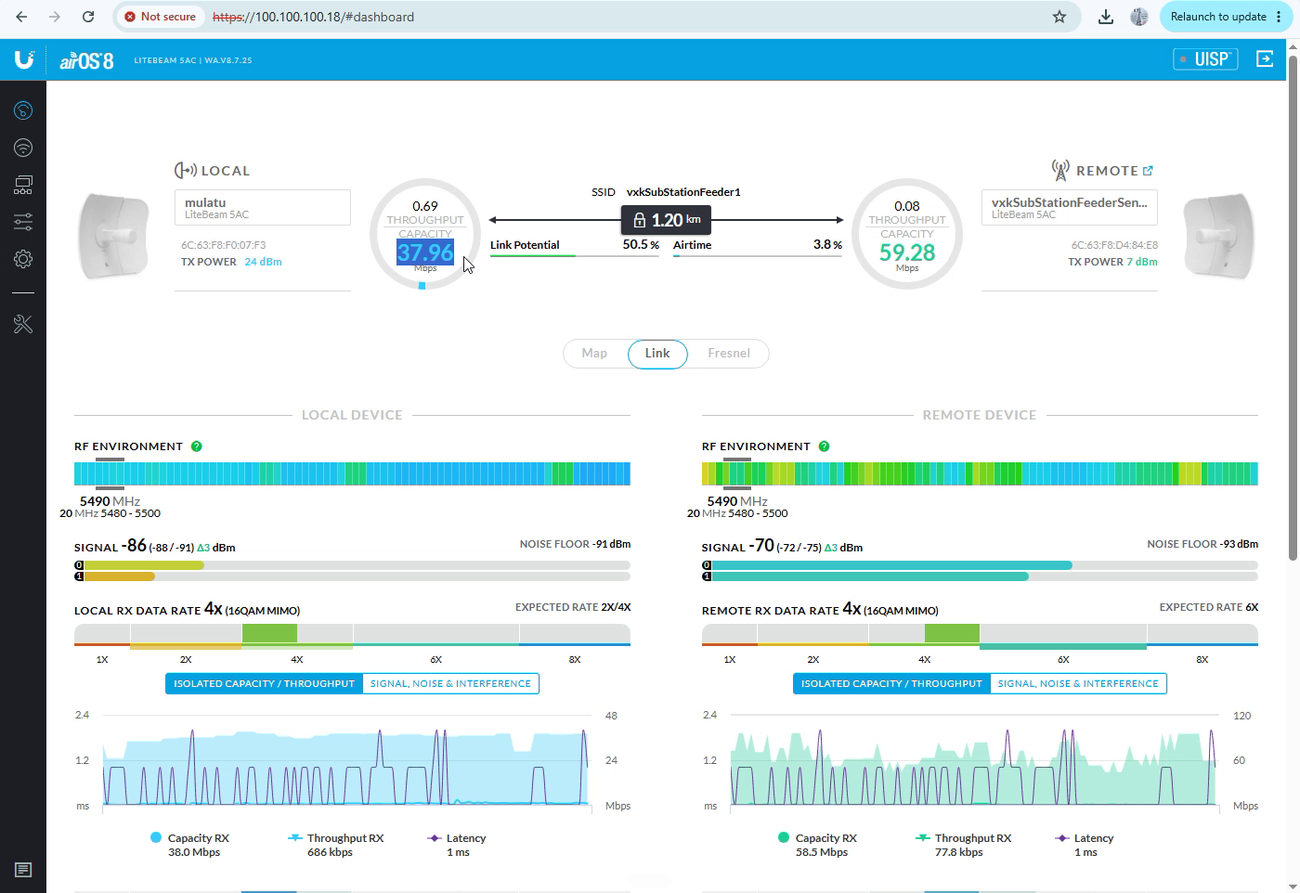
Understanding the Wireless Point-to-Point (PtP) Topology
A standard Ubiquiti airMAX deployment consists of a wireless bridge established between two devices: • The Access Point / Sector (Right Side): Positioned at the tower or main distribution point to broadcast the primary internet feed. • The Client Station (Left Side): Positioned at the local client site (named "B Molatu" in this example), pointing back toward the tower. When analyzing the management dashboard, the Link Potential metric indicates the theoretical capacity of the RF (Radio Frequency) environment. In this deployment, the over-the-air link spans a physical distance of 1.2 kilometres, capable of carrying an airside transmission speed up to 250 Mbps